Self Training
- Independent learning
- Flexible
- Accessible
- Lifelong learning

Popular:
HR & HCM track • 7 modules
Workday Leave and Absence Management is essential in supporting organizations’ workforce. This course equips participants with all of the knowledge and abilities required for managing leave and absence using Workday.
This course covers topics including creating and managing leave types, configuring leave accruals, assigning leave balances, tracking time off, managing absences and integrating with other Workday modules. By the completion of this course, students should feel equipped to effectively administer their organization’s leave and absence management in Workday.
Workday Leave and Absence Management Course provides online training on managing employee leaves and absences in Workday, from creating absence requests, tracking time off requests, to maintaining balances. You will learn all these processes as you navigate this course!
Workday Leave and Absence Management is an intelligent system designed to automate and streamline organizational leave management practices more efficiently and effectively than traditional solutions can. By automating employee leave requests through this powerful solution, organizations are better able to administer employee leaves efficiently and effectively and manage absence more cost efficiently and successfully.
As well as giving employees greater visibility into their leave and absence balances, this system includes features that make it simple and flexible enough to suit an organization’s unique requirements.
The system gives managers an experience & overview of their team’s leave & absence while giving employees visibility into their time off work. Leave can also be managed for both individuals and teams making it simple to stay on top of time spent away from work.
This course is tailored for individuals responsible for overseeing leave and absence management within an organization, covering topics like creating leave types, absence records, balances and requests as well as vacation, sick and bereavement leave taken within Workday.
Workday Leave and Absence Management does not entail any specific prerequisites; rather, as one of its functional modules it does require some prior understanding about employee leave/absence management practices and trends. To use Workday Leave & Absence Management effectively you will need a basic knowledge about leave /absence.
Working knowledge of Workday HCM would prove extremely useful when learning its technology course accurately and comprehensively. By the time of completion, however, you will become adept at maintaining workforce skills within any organization.
Once you understand Workday technology and concepts, and are confident with navigating its implementation, a certification exam must be passed in order to receive official recognition as part of Workday certification process. Once passed successfully, official certificates from Workday will be made available as evidence that you passed their Certification Exam successfully.
How you go from your first Leave & Absence lesson to being job-ready, step by step.
Absence Management Overview · Time Off Plans and Components · Calculation Engine
Leave of Absence · Absence Administration · Business Processes · Reports
Practise every topic in a Workday tenant, with real-time case studies.
The project is integrated into the curriculum, so you apply what you learn as you go.
Choose the way of learning Leave & Absence that suits you or your team.
Based on 3,264 learner reviews.

My Workday training as a Workday Specialist gave me access to advanced HR tasks quickly and effortlessly I feel honored that it's now been my career path of choice.

My Workday training provided me with the ability to lead teams effectively, ensure successful implementations, and optimize system performance making a smooth transition into my leadership role confidently and successfully.

Thanks to my training as a Workday Architect, I now possess the insight needed to design and integrate solutions that meet both business and technical requirements it is both challenging and satisfying work, something which I enjoy immensely.

My Workday Lead training provided invaluable experience guiding teams and making strategic decisions, helping me develop leadership abilities as well as problem-solving abilities that were integral in shaping my leadership abilities and problem-solving capabilities.

My Workday training provided practical experience that gave me confidence to analyze business processes and configure Workday solutions with great proficiency, helping my clients optimize their HR functions more successfully than ever. It has been truly exciting.

My Workday training provided me with invaluable skills and knowledge that greatly increased my confidence, leading me to excel as an HRIS Analyst while furthering my career goals.

Through my training to become an integration specialist for Workday and other enterprise systems, I developed expertise to successfully facilitate seamless integrations. This role offers new challenges every day and has proven an outstanding career move for me.

My Workday training provided a deep insight into financial processes within Workday system. This dynamic and rewarding field allows me to continue expanding professionally.

My Workday Reporting Consultant training enabled me to master complex reporting techniques, providing insights that lead to strategic decisions. Thanks to this course I now enjoy an incredible career path within reporting services.

My Workday Functional Consultant training was life changing; providing me with all of the skills required to customize the system to meet a wide array of client requirements and make an impactful difference on business performance.
Workday Absence Management refers to the practice of monitoring and controlling employee absences such as vacation leave, sick days and any other types of leave that employees might take during an work day, such as sick leave. This concept encompasses vacation, sick or other forms of personal leave as examples of this concept.
You may submit an absence request through Workday in order to take time away from your work for bereavement leave, jury duty service, vacation/holidays or any other valid purpose.
A TOPSW refers to work that must be accomplished outside regular working hours by employees outside their regular shift, typically for duties such as attending meetings and trainings that cannot be accomplished during normal hours e.g. meeting cancellation or attending trainings sessions that cannot take place during regular shift hours (example).
No. Unfortunately Workday does not currently provide unlimited PTO.
To access your leave balance on Workday, log onto your Workday account if it’s currently subscribed by you and accessing “Leaves – Manage Account”.
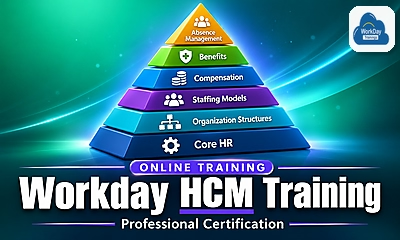
The foundation training for building your skills across the core modules of Workday.
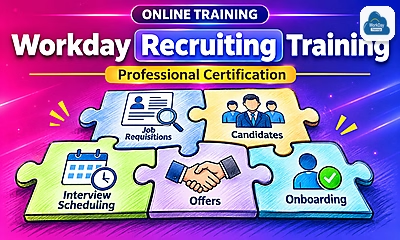
Learn Workday Recruiting, with a focus on managing and sorting candidate profiles.
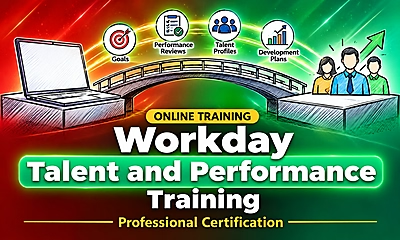
Talent and performance management processes in Workday.
Enquire now
Tell us what you'd like to learn and we'll get back to you with batch timings and course details.